

















In 2026, many businesses will have to decide if upgrading their Microsoft Technology Stack is worth it; and just because applications created using older versions of the .NET Framework still run fine now does not mean that they will still be running in an environment that has been deprecated (no longer a supported version) or insecure and impossible to support as time goes on. Increased Performance Bottlenecking issues, Compatibility Problems, and Increased Cyber Security exposure with older versions of the .NET Framework have put many organizations at risk and exposed them to new problems.
Upgrading the .NET Framework version to a new release is also about maintaining an Environment that is stable, secure, and able to be supported long-term, and will also be important due to the constant changes of Operating Systems, including the first release of Windows 11 and the expected increase in demand for Cloud-based technology. Organizations that choose to delay their upgrade to the latest version of the .NET Framework will create additional Technical Debt and further expose themselves to risk.
Also, upgrading from one .NET Framework version to another is NOT an easy and or quick process. Organizations often have dependencies on Legacy Integration, develop Custom Libraries, and create Business Logic that was developed on earlier versions of the .NET Framework; therefore, if they do not upgrade using a structured methodology, they may encounter Broken/Corrupt Dependencies and Run-Time Errors or Performance Difficulties when attempting to upgrade an existing .NET Framework.
What is .NET Framework?
The .NET Framework is a software development platform developed and distributed by Microsoft. It allows developers to create and run Windows-based applications. And release in the early 2000s and has offered a wide range of facilities to developers. It has provided a comprehensive development platform for building desktop applications, web applications, and enterprise-level applications.
It has two main components: the Common Language Runtime and the .NET Class Library. Common Language Runtime manages memory and security. .NET Class Library provides code libraries to developers to perform various tasks such as database operations, file handling, network communication, and security.
It has been widely accepted and adopted for building enterprise-level applications, especially for environments running .NET Framework and ASP.NET for building web applications. Many internal business applications and critical applications are running on .NET. But despite the reliability and robustness of the .NET Framework, it was developed to support the Windows operating system. With the evolution of cloud and multi-platform development, .NET Core and unified .NET were released to support modern application development.
Why Upgrading .NET Framework in 2026 is Crucial?
Below are the key reasons why organizations must prioritize a framework upgrade:
For all enterprises that wish to continue to forestall the current business needs of their companies with the increasingly modern `.NET Framework`, futureproofing mostly requires upgrading their applications with support to operate against the newer version of the ' .NET Framework `2026` through ongoing maintenance:
1. Enhanced Security and Compliance:
Older versions of the .NET Framework are unlikely to have any security patches installed or supported by Microsoft. Without an upgrade, the enterprise is easily at risk from cyber threats due to being an unsupported version.
2. Compatibility with Modern OS:
New Windows version, i.e., `Windows 11`, requires that the enterprise ensure their existing .NET Framework will convert correctly to `Windows 11`, e.g., to avoid runtime errors.
3. Performance Improvements:
More modern .NET Frameworks provide optimized runtime execution and improved memory management performance. Additionally, higher execution speeds lead to improved responsiveness and overall user experience.
4. Access to Modern Development Tools:
More modern versions of .NET Framework integrate better with modern cloud environments, e.g., with IDEs and DevOps pipelines, leading to an accelerated development cycle and the efficient deployment of code.
5. Better Integration Capabilities:
More modern versions of .NET Framework support integrations with contemporary API standards, cloud-based serviceable applications, and microservices architecture, enabling current and prospective future integrations.
6. Future-Proofing Business Applications:
By remaining updated to the minimum version of .NET Framework versions ensure the future support and scalability of the enterprise applications developed to remain current with evolving business needs.
Difference Between .NET Framework and .NET Core:
Knowledge of the differences between .NET Framework and .NET Core is critical in planning an upgrade path. Both .NET Framework and .NET Core have a similar ancestry, but they have different architectures, compatibility, and flexibility.
.NET Framework is a Windows-only runtime that is tightly coupled with the Windows operating system. It is compatible with mature enterprise applications, especially .NET Framework and ASP.NET applications. On the other hand, .NET Core is a cross-platform runtime that supports Windows, Linux, and macOS operating systems. It is compatible with cloud-native and containerized applications.
Another difference between .NET Framework vs .NET Core is that .NET Core allows self-contained deployments, enabling applications to operate independently of the runtime. However, it should be noted that migration from .NET Framework to .NET Core is not always straightforward, as some legacy libraries and applications may not fully support .NET Core. Companies should consider whether they require an upgrade from .NET Framework to a supported version of .NET Framework or a complete migration to a new version of .NET.
Step-by-Step Guide: How to Upgrade .NET Framework in 2026
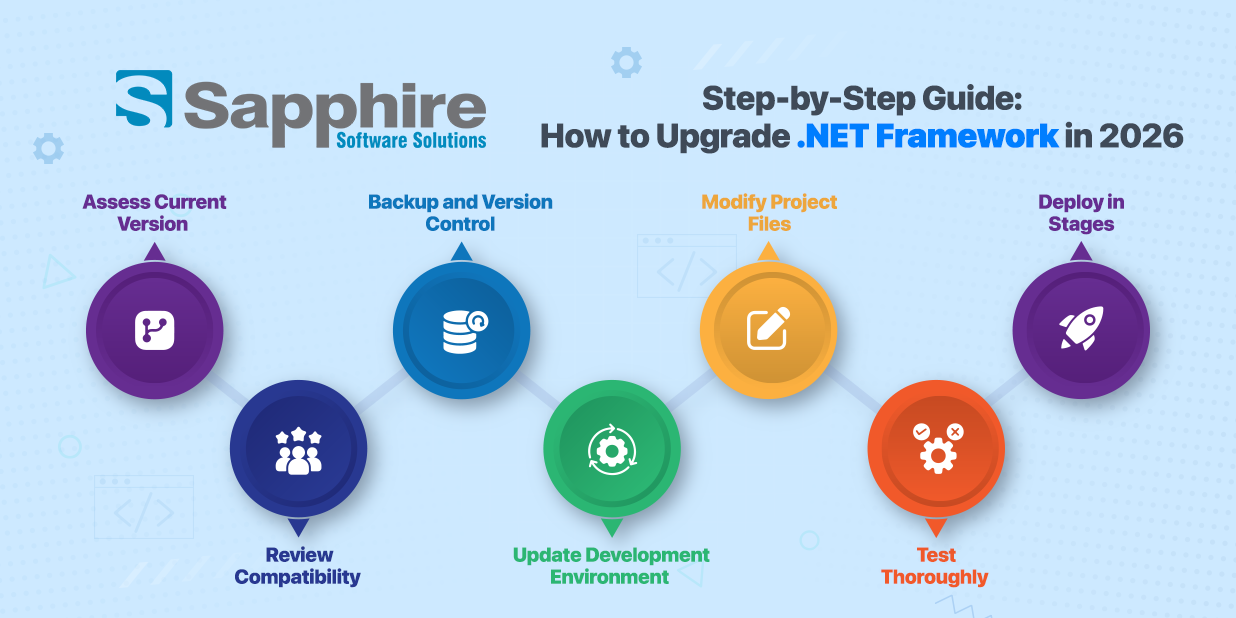
Update for .NET Framework requires a structured approach to avoid disruptions. Here’s a practical step-by-step guide:
- Assess Current Version: Identify the current framework version running in your environment. Review dependencies, integrations, and compatibility requirements.
- Review Compatibility: Evaluate whether third-party libraries and internal components support the target version. This step is critical when planning an update for the .NET Framework.
- Backup and Version Control: Create full backups and maintain version-controlled repositories before beginning the upgrade.
- Update Development Environment: Ensure Visual Studio and build tools support the new framework version.
- Modify Project Files: Update target framework settings in project configuration files.
- Test Thoroughly: Conduct unit testing, integration testing, and performance validation.
- Deploy in Stages: Implement staged rollouts to minimize risk.
Common Issues During .NET Framework Upgrade and How to Fix Them
Many difficulties arise when you upgrade the .NET Framework. Some of the most frequent problems include broken dependencies, deprecated APIs, and configuration conflicts.
Usually, there will be a lot of compatibility issues between older libraries and the newer versions of the framework, which can usually be solved by updating or replacing them with newer packages with compatible versions.
If the environments are not properly aligned with each other during runtime, you may encounter runtime errors. Having a proper configuration for your updated .NET Framework on Windows 11 can help mitigate OS compatibility issues.
You may also find that performance after an upgrade may require some optimization or reconfiguration as well.
You should have a robust plan in place for testing and rolling back if needed to protect yourself from these types of problems.
Working with a team that has extensive experience can help reduce your level of risk and help speed up the troubleshooting process.
Why Businesses Trust Sapphire, a .Net Development Company, for .NET Framework Upgrades?
This is the main reason businesses prefer to work with Sapphire Software Solutions as a reliable .Net Development Company. The company does not consider .Net framework upgrades as simple version updates but as strategic business modernization initiatives that focus on long-term business continuity.
Sapphire's expertise in .Net framework upgrades helps businesses in evaluating whether they should consider simple .Net framework upgrades or look for .NET Core development services to modernize their applications. This helps businesses in making informed decisions based on their knowledge of .NET Framework vs. .NET Core.
Additionally, Sapphire Software Solutions provides the best ASP.NET Core Development Services. Instead of implementing changes all at once, upgrades are rolled out in controlled phases. This approach protects mission-critical applications and ensures smooth transitions across environments, including compatibility with Windows 11 systems.
Conclusion:
Any organization that delays upgrading the .NET Framework may end up facing compatibility issues that may affect the application's scalability and security. Therefore, understanding the difference between .NET Framework vs .NET Core and how to upgrade from one to another while considering the compatibility issues that may come with it is crucial in helping businesses upgrade without any issues or downtime.
Whether upgrading the .NET Framework or aligning with the updated .NET Framework Windows 11, upgrading is crucial in helping the business run smoothly without any issues. An experienced .Net Development Company is vital in ensuring that upgrading is smooth without any downtime.